


Trigonometry for Game Programming – SpriteKit and Swift Tutorial: Part 1/2
Learn trigonometry for game programming using SpriteKit and Swift. You will learn the theory and then practice using trigonometry by making a space shooter game! By Bill Morefield.
Using Trig to Find Your Target
This is a great start — you have a spaceship moving along pretty smoothly! But so far the little spaceship’s life is too easy and carefree as that big cannon isn’t doing anything. Let’s change that.
The cannon consists of two sprites: the fixed base, and the turret that can rotate to take aim at the player. You want the cannon’s turret to point at the player at all times. To get this to work, you’ll need to figure out the angle between the turret and the player.
To figure this out, it will be very similar to the spaceship rotation calculation to face its heading direction. This time, the triangle is derived from centers of the two sprites:
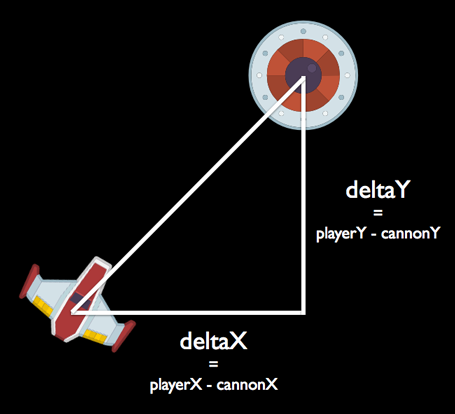
Again, you can use atan2(_:_:) to calculate this angle. Add the following method inside of GameScene:
func updateTurret(_ dt: CFTimeInterval) {
  let deltaX = playerSprite.position.x - turretSprite.position.x
  let deltaY = playerSprite.position.y - turretSprite.position.y
  let angle = atan2(deltaY, deltaX)

  turretSprite.zRotation = angle - 90 * degreesToRadians
}
The deltaX and deltaY help measure the distance between the player sprite and the turret sprite. You plug these values into atan2(_:_:) to get the relative angle between them.
As before, you need to convert this angle to include the offset from the X-axis (90 degrees) so the sprite is oriented correctly. Remember that atan2(_:_:) always gives you the angle between the hypotenuse and the 0-degree line; it’s not the angle inside the triangle.
Add the following code to the end of update(_:):
updateTurret(deltaTime)
Build and run. The turret will now always point toward the spaceship.

You can accomplish this by “blending” the old angle with the new one, just like you did with the spaceship’s rotation angle. The smaller the blend factor, the more time the turret needs to catch up with the spaceship. See if you can implement this on your own.
You can accomplish this by “blending” the old angle with the new one, just like you did with the spaceship’s rotation angle. The smaller the blend factor, the more time the turret needs to catch up with the spaceship. See if you can implement this on your own.
Using Trig for Collision Detection
The spaceship can fly directly through the cannon without consequence. It would be more challenging (and realistic) if it loses health when colliding with the cannon. This is where you enter the sphere of collision detection (sorry about the pun! :]).
You could use SpriteKit’s physics engine for this, but it’s not that hard to do collision detection yourself, especially if you model the sprites using simple circles. Detecting whether two circles intersect is a piece of cake. All you have to do is calculate the distance between them (*cough* Pythagoras) and see if it is smaller than the sum of the radii of both circles.
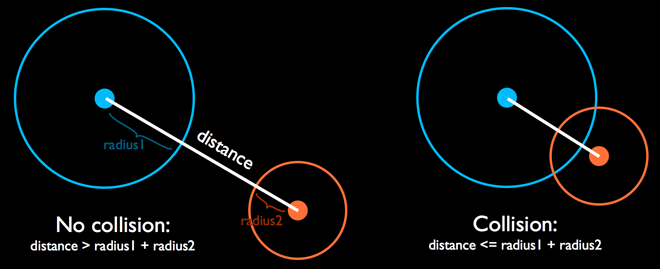
Add two new constants right above GameScene:
let cannonCollisionRadius: CGFloat = 20
let playerCollisionRadius: CGFloat = 10
These are the sizes of the collision circles around the cannon and the player. Looking at the sprite, you’ll see that the actual radius of the cannon image in pixels is slightly larger than the constant you’ve specified (around 25 points), but it’s nice to have a bit of wiggle room. You don’t want your games to be too unforgiving, or players may not find it as fun.
The fact that the spaceship isn’t circular shouldn’t deter you. A circle is often a good enough approximation for the shape of an arbitrary sprite. Due to its shape, it has the big advantage of a much simpler trig calculations. In this case, the body of the ship is roughly 20 points in diameter (remember, the diameter is twice the radius).
First, add this property to GameScene for the collision sound effect:
let collisionSound = SKAction.playSoundFileNamed("Collision.wav", waitForCompletion: false)
Add the following method to GameScene to detect collision:
func checkShipCannonCollision() {
  let deltaX = playerSprite.position.x - turretSprite.position.x
  let deltaY = playerSprite.position.y - turretSprite.position.y

  let distance = sqrt(deltaX * deltaX + deltaY * deltaY)
  guard distance <= cannonCollisionRadius + playerCollisionRadius  else { return }
  run(collisionSound)
}
You’ve seen how this has worked before. First, you calculate the distance between the X-positions of the two sprites. Second, you calculate the distance between the Y-positions of the two sprites. Treating these two values as the sides of a right triangle, you can then calculate the hypotenuse. The hypotenuse is the distance between the two sprites. If that distance is smaller than the sum of the collision radii, play the sound effect.
Add a call to this new method at the end of update(_:):
checkShipCannonCollision()
Time to build and run again. Give the collision logic a whirl by flying the spaceship into the cannon.

Notice that the sound effect plays endlessly as soon as a collision begins. That's because, while the spaceship flies over the cannon, the game registers repeated collisions, one after another. There isn’t just one collision, there are 60 per second, and it plays the sound effect for every one of them!
Collision detection is only the first half of the problem. The second half is collision response. Not only do you want audio feedback from the collision, but you also want a physical response — the spaceship should bounce off the cannon.
Add this constant to the top of GameScene.swift:
let collisionDamping: CGFloat = 0.8
Then add these lines of code right below the guard statement in checkShipCannonCollision():
playerAcceleration.dx = -playerAcceleration.dx * collisionDamping
playerAcceleration.dy = -playerAcceleration.dy * collisionDamping
playerVelocity.dx = -playerVelocity.dx * collisionDamping
playerVelocity.dy = -playerVelocity.dy * collisionDamping
This is very similar to what you did to make the spaceship bounce off the screen borders. Build and run to see how it works.
It looks pretty good if the spaceship is going fast when it hits the cannon. But if it's moving too slowly, then even after reversing the speed, the ship sometimes stays within the collision radius and never makes its way out of it. Clearly, this solution has some problems.
Instead of just bouncing the ship off the cannon by reversing its velocity, you need to physically push the ship away from the cannon by adjusting its position so that the radii no longer overlap.
To do this, you'll need to calculate the vector between the cannon and the spaceship. Fortunately, you have calculated this earlier to measure the distance between them. So how do you use that distance vector to move the ship?
The vector formed by deltaX and deltaY is already pointing in the right direction, but it's the wrong length. The length you need it to be is the difference between the radii of the ships and its current length. This way, when you add it to the ship's current position, the ship will no longer be overlapping the cannon.
The current length of the vector is distance, but the length that you need it to be is:
cannonCollisionRadius + playerCollisionRadius - distance
So how can you change the length of a vector?
The solution is to use a technique called normalization. You normalize a vector by dividing the X and Y components by the current scalar length (calculated using Pythagoras). The resultant "normal" vector, has an overall length of one.
Then, you just multiply the X and Y by the desired length to get the offset for the spaceship. Add the following code right under the previous lines of code you added to checkShipCannonCollision():
let offsetDistance = cannonCollisionRadius + playerCollisionRadius - distance
let offsetX = deltaX / distance * offsetDistance
let offsetY = deltaY / distance * offsetDistance
playerSprite.position = CGPoint(
  x: playerSprite.position.x + offsetX,
  y: playerSprite.position.y + offsetY
)
Build and run. You'll see the spaceship now bounces properly off the cannon.
To round off the collision logic, you'll subtract some hit points from the spaceship and the cannon. Then, update the health bars. Add the following code right before run(collisionSound):
playerHP = max(0, playerHP - 20)
cannonHP = max(0, cannonHP - 5)

updateHealthBar(playerHealthBar, withHealthPoints: playerHP)
updateHealthBar(cannonHealthBar, withHealthPoints: cannonHP)
Build and run again. The ship and cannon now lose a few hit points each time they collide.
