


Trigonometry for Game Programming: Part 1/2
Learn Trigonometry for Game Programming in this 2-part tutorial series, where you’ll learn the theory and then practice by making a space shooter game! By Matthijs Hollemans.
Blending Angles for Smooth Rotation
Of course, fixing one thing always breaks something else. Try slowing down the spaceship until it has stopped, then flip the device so the spaceship has to turn around and fly the other way.
Previously, that happened with a nice animation where you actually saw the ship turning. But because you just added some code that prevents the ship from changing its angle at low speeds, the turn is now very abrupt. It’s only a small detail, but it is the details that make great products.
The fix is to not switch to the new angle immediately, but to gradually “blend” it with the previous angle over a series of successive frames. This re-introduces the turning animation and still prevents the ship from rotating when it is not moving fast enough.
Blending sounds fancy, but it’s actually quite easy to implement. It does require you to keep track of the spaceship’s angle between updates, so add a new instance variable for it in the implementation block in HelloWorldLayer.m:
@implementation HelloWorldLayer
{
    ...
    float _playerAngle;
}
Change the rotation code in updatePlayer from this:
float speed = sqrtf(_playerSpeedX*_playerSpeedX + _playerSpeedY*_playerSpeedY);
if (speed > 40.0f)
{
    float angle = atan2f(_playerSpeedY, _playerSpeedX);
    _playerSprite.rotation = 90.0f - CC_RADIANS_TO_DEGREES(angle);
}
To this:
float speed = sqrtf(_playerSpeedX*_playerSpeedX + _playerSpeedY*_playerSpeedY);
if (speed > 40.0f)
{
    float angle = atan2f(_playerSpeedY, _playerSpeedX);

    const float RotationBlendFactor = 0.2f;
    _playerAngle = angle * RotationBlendFactor + _playerAngle * (1.0f - RotationBlendFactor);
}

_playerSprite.rotation = 90.0f - CC_RADIANS_TO_DEGREES(_playerAngle);
The _playerAngle variable combines the new angle and its own previous value by multiplying them with a blend factor. In human-speak, this means the new angle only counts for 20% towards the actual rotation that you set on the spaceship. Of course, over time more and more of the new angle gets added so that eventually the spaceship does point in the proper direction.
Note that the line that sets the _playerSprite’s rotation property is now outside the if statement.
Build and run to verify that there is no longer an abrupt change from one rotation angle to another.

Now try flying in a circle a couple of times, both clockwise and counterclockwise. You’ll notice that at some point in the turn the spaceship suddenly spins in the opposite direction. It always happens at the same point in the circle. What’s going on?
Well, there is something you should know about atan2f(). It does not return an angle in the convenient range of 0 to 360 degrees, but a value between +π and –π radians, or between +180 and -180 degrees to us non-mathematicians:
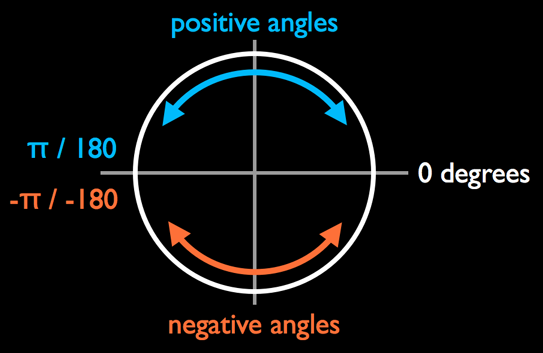
That means if you’re turning counterclockwise, at some point the angle will jump from +180 degrees to -180 degrees; or the other way around if you’re turning clockwise. And that’s where the weird spinning effect happens.
The problem is that when the new angle jumps from 180 degrees to -180 degrees, _playerAngle is still positive because it is trailing behind a bit. When you blend these two together, the spaceship actually starts turning the other way around. It took me a while to figure out what was causing this!
To fix it, you need to recognize when the angle makes that jump and adjust _playerAngle accordingly. Add a new instance variable at the bottom of the HelloWorldLayer implementation block:
@implementation HelloWorldLayer
{
    ...
    float _lastAngle;
}
And change the rotation code one more time from this:
float speed = sqrtf(_playerSpeedX*_playerSpeedX + _playerSpeedY*_playerSpeedY);
if (speed > 40.0f)
{
    float angle = atan2f(_playerSpeedY, _playerSpeedX);

    const float RotationBlendFactor = 0.2f;
    _playerAngle = angle * RotationBlendFactor + _playerAngle * (1.0f - RotationBlendFactor);
}

_playerSprite.rotation = 90.0f - CC_RADIANS_TO_DEGREES(_playerAngle);
To this:
float speed = sqrtf(_playerSpeedX*_playerSpeedX + _playerSpeedY*_playerSpeedY);
if (speed > 40.0f)
{
    float angle = atan2f(_playerSpeedY, _playerSpeedX);

    // Did the angle flip from +Pi to -Pi, or -Pi to +Pi?
    if (_lastAngle < -3.0f && angle > 3.0f)
    {
        _playerAngle += M_PI * 2.0f;
    }
    else if (_lastAngle > 3.0f && angle < -3.0f)
    {
        _playerAngle -= M_PI * 2.0f;
    }

    _lastAngle = angle;
    const float RotationBlendFactor = 0.2f;
    _playerAngle = angle * RotationBlendFactor + _playerAngle * (1.0f - RotationBlendFactor);
}

_playerSprite.rotation = 90.0f - CC_RADIANS_TO_DEGREES(_playerAngle);
Build and run. That’ll fix things right up and you should have no more problems turning your spacecraft!
This may have seemed like an arcane little problem not worth so much time, but it's good to be aware that atan2f() gives you angles from -180 degrees (or –π radians) to +180 degrees (or π radians). If you’re using arc tangent to calculate an angle and you get weird behavior like the spinning you saw here, then you might need to verify that your angles really are what you expect them to be.
Using Trig to Find Your Target
This is a great start - you have a spaceship moving along pretty smoothly! But so far the spaceship's life is too easy and carefree. Let's spice this up by adding an enemy: a big cannon!
Add two new instance variables in the implementation block in HelloWorldLayer.m:
@implementation HelloWorldLayer
{
    ...
    CCSprite *_cannonSprite;
    CCSprite *_turretSprite;
}
You'll set these sprites up in init. Place this code before the creation of _playerSprite so that the spaceship always gets drawn “above” the cannon:
_cannonSprite = [CCSprite spriteWithFile:@"Cannon.png"];
_cannonSprite.position = ccp(_winSize.width/2.0f, _winSize.height/2.0f);
[self addChild:_cannonSprite];

_turretSprite = [CCSprite spriteWithFile:@"Turret.png"];
_turretSprite.position = ccp(_winSize.width/2.0f, _winSize.height/2.0f);
[self addChild:_turretSprite];
The cannon consists of two sprites: the fixed base and the turret that can rotate to take aim at the player. Build and run, and you should have a brand-new cannon sitting smack in the middle of the screen.
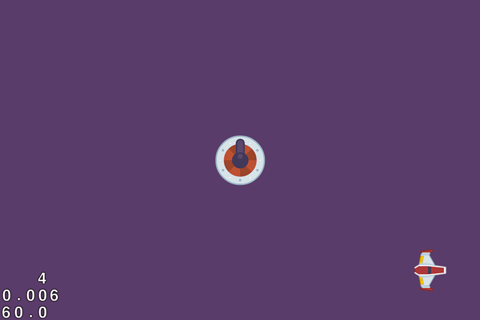
Now you'll give the cannon a target to snipe at - I bet you know who!
Yep, its turret should point at the player at all times. To get this to work, you need to figure out the angle to rotate the turret so that it points toward the player.
Figuring this out will be very similar to how you figured out how to rotate the spaceship in order to point toward the direction it's moving in. The difference is that this time, the triangle won't be based on the speed of the spaceship. Instead it will be drawn between the center positions of the two sprites:
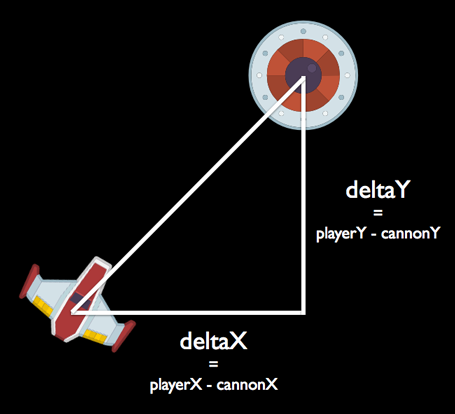
Again, you can use atan2f() to calculate this angle. Add the following method:
- (void)updateTurret:(ccTime)dt
{
	float deltaX = _playerSprite.position.x - _turretSprite.position.x;
	float deltaY = _playerSprite.position.y - _turretSprite.position.y;

	float angle = atan2f(deltaY, deltaX);
	_turretSprite.rotation = 90.0f - CC_RADIANS_TO_DEGREES(angle);
}
The deltaX and deltaY variables measure the distance between the player sprite and the turret sprite. You plug these values into atan2f() to get angle of rotation.
As before, you need to convert this angle to degrees and adjust for the differences between mathematics and Cocos2D. Remember that atan2() always gives you the angle between the hypotenuse and the 0-degree line. It is not the angle inside the triangle.
Don’t forget to call this new updateTurret: method from update, or nothing much will happen:
- (void)update:(ccTime)dt
{
    [self updatePlayer:dt];
    [self updateTurret:dt];
}
Build and run. The cannon is now always pointing at the spaceship. See how easy that was? That’s the power of trig for you!

Challenge: It is unlikely that a real cannon would be able to act so instantaneously – it would have to be able to predict exactly where the target was going. Instead, a real cannon would always be playing catch up.
You can accomplish this by “blending” the old angle with the new one, just like you did earlier. The smaller the blend factor, the more time the turret needs to catch up with the spaceship. See if you can implement this on your own.
Challenge: It is unlikely that a real cannon would be able to act so instantaneously – it would have to be able to predict exactly where the target was going. Instead, a real cannon would always be playing catch up.
You can accomplish this by “blending” the old angle with the new one, just like you did earlier. The smaller the blend factor, the more time the turret needs to catch up with the spaceship. See if you can implement this on your own.