


WWDC 2026 Recap
A rundown of WWDC 2026’s three big themes: platform improvements, parental controls, and Apple Intelligence, with a closer look at what’s new for developers in Xcode 27. By Josh Steele.
WWDC 2026 has come and gone with a moderate amount of fanfare, at least compared to previous years. If you just watched the Keynote on Monday, you saw 3 main themes, but for one of them, there was a lot sitting under the surface.
Platform Improvements
Alongside the release of macOS Golden Gate (macOS 27), the rest of the “27” releases were announced, keeping with the year naming convention started in last year’s WWDC. When you think “platform improvements”, those that have been with Apple for a while may be having flashbacks to Snow Leopard, which was a version of OS X (which is what macOS went by back then), that was largely focused on fixing bugs and improving performance, instead of new features.
This year, Apple is giving all of the “27” OSes a bit of polish up front – namely with a user adjustable glass transparency in Liquid Glass, along with other tweaks – and a LOT of performance tune ups under the hood. We’ll have to see how these all translate to real life, especially on older devices (with support going back to iPhone 11!), but they quote some pretty nice improvements. Just having the ability to keep using iMessage while a large pictures transmits is worth it for me!
Trust and Safety
For anyone who manages their child’s Apple devices, the built in tools like Screen Time have been…. ok? Like many things throughout the OS, these controls needed their own polish, bug fixes, and enhancements.
Parents can now more finely tune the apps, websites, contacts and times that children can use their devices. The “Ask-to-buy” concept has been carried over to asking for access to websites and contacts, which is a nice feature. The extra fidelity also allows you to provide your child access to more things as they get older.
Apple Intelligence and Siri AI
The rest of the keynote, the majority of the Platforms State of the Union and a very, very large number of the developer videos released this week revolved around the improvements around Siri AI, the ever expanding AI frameworks (some of which are now open sourced) and what underpins it all, Apple Intelligence and App Intents.
They keynote shows what Siri AI can do for the end user, but how do you enable those features in your app? Let’s take a look at some of the highlights in the “AI & Machine Learning” section of this year’s WWDC:
Xcode Improvements for AI
The introduction of AI capabilities starting in Xcode 18 and continuing into Xcode 26 showed some decent efforts to build support into the IDE. Even this year, the introduction of agentic capabilities allowed developers to take a more hands off approach to coding.
Xcode 27, though? Wow.
Not only is it easier than ever to enable models, including custom models running on your local machine, you can supercharge their abilities with built in agents specifically designed for Apple workflows. It all starts with Assistant Conversations, which are now presented in their own window, so they can be arranged just like any other editor.
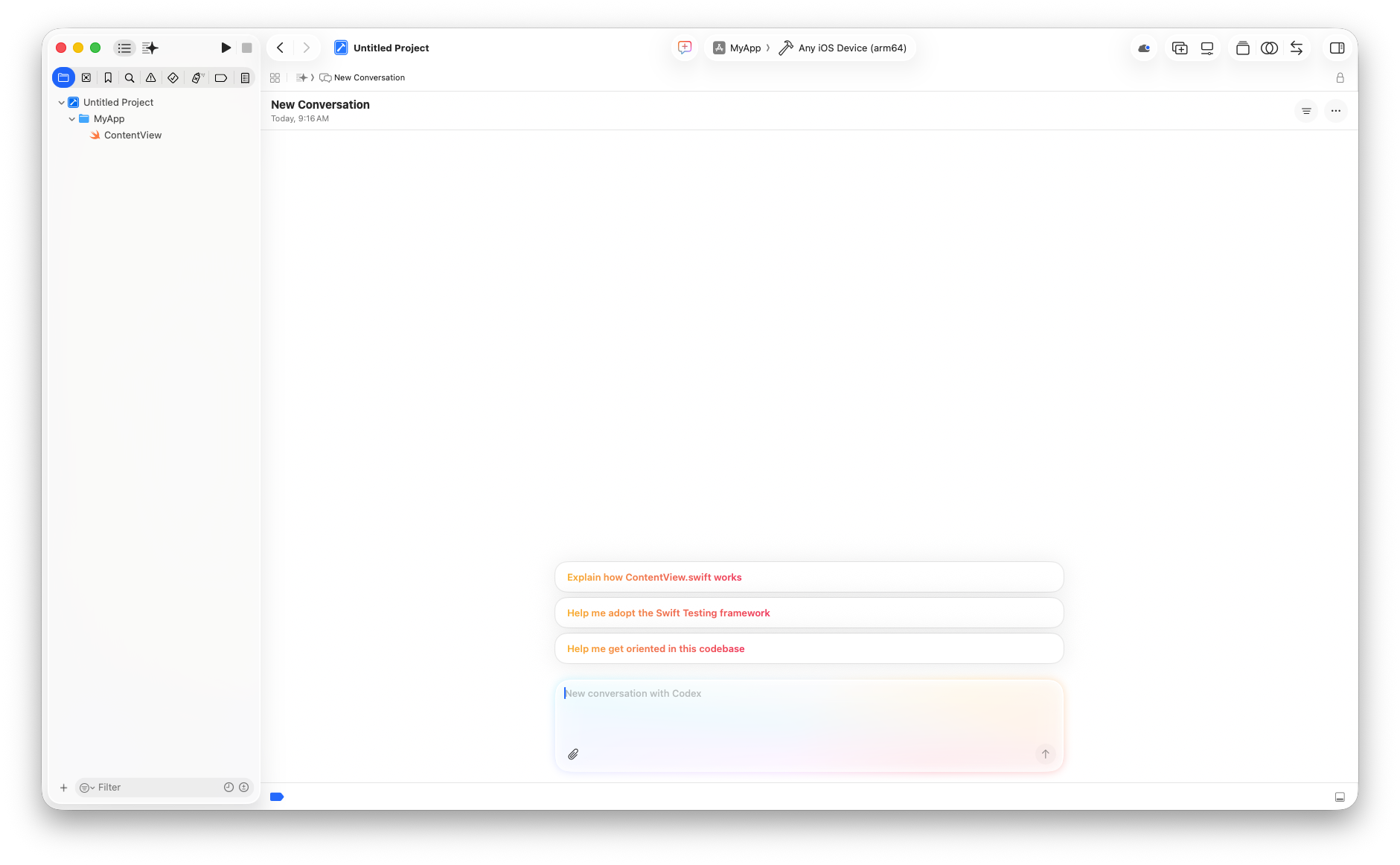
Let’s say you want to Localize your app to French. Before, this required finding translations for all of your user facing strings, building a strings file, making sure all of those translations made sense not only to the native language but to your app. It was a lot. Now you just need something like this.
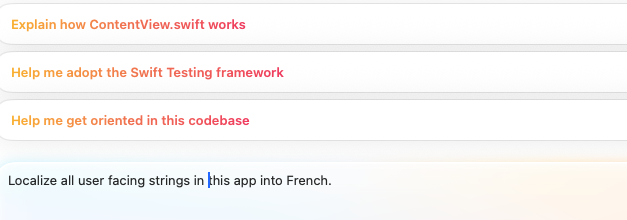
Then you can sit back and watch Xcode localize the app for you! Even better, you can multitask. While that localization is going on, you could start another conversation to localize into another language, or even add Accessibility labels. Now there’s no excuse to enable your app to reach as many people as possible around the world.
App Schemas are usable!
App Schemas have been around in some shape for several years now. They were originally intended to facilitate what we are just now seeing in this year’s WWDC (remember when Apple Intelligence first came out… and how it really didn’t?). App Schemas allow you to decorate your App Entities and App Intents so Apple Intelligence know how to best use them. Apple’s learning models were trained on key features of iOS such as calendars, mail messages, and photos, so if your App Entities or App Intents use those features, you’ll get tight integration with Siri AI, allowing you do fun things like the various multi-step conversations seen in the Keynote.
The key thing to remember here is that if your Entities and Intents *don’t* conform to one of these schemas, you won’t get the full benefits of Siri AI, but you can still use them in other areas like Shortcuts or the Action button.
App Intents API improvements
Since App Schemas are actually useful now, using them when making App Intents is easier as well! At its core, App Intents haven’t change a lot since last year. There are some nice APIs that have been included to support providing values to intents, but if you have your EntityQuerys setup, you’re probably good to go. Xcode’s autocomplete when working with App Schemas makes filling out the App Entities and App Intents a breeze. 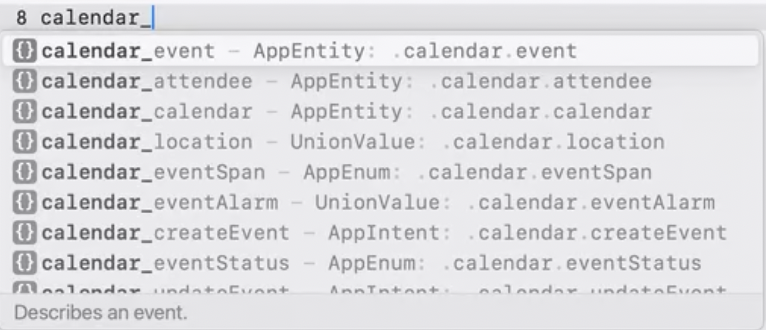
Core AI
For those of you into crafting or fine tuning the models you use in your app, a new framework called Core AI is the place to go. This new inference framework covers the full model lifecycle, taking advantage of the hardware on your machine, and comes with Swift and Python APIs, alongside a developer toolchain inside Xcode and Instruments.
Foundation models improvements
The Foundation models framework that Apple released last year has seen some major improvements. In addition to providing a more robust on device model and the ability to use Google-powered Private Cloud Compute (which has a powerful reasoning model), you can now bring any model into your LanguageModelSession.
// On-device Apple Foundation Model
let model = SystemLanguageModel()

// let model = PrivateCloudComputeLanguageModel()
// let model = MLXLanguageModel(modelID: "mlx-community/my-model")

let session = LanguageModelSession(model: model)
You can even use MLX, MLX-LM, and the new MLX-LM Server to run local models on your local device, just like tools such as LM Studio.
Dynamic Profiles allow you to program multiple states for your app, even allowing you to write a tool to switch between them based on what the user is doing in your app. Each profile looks like this:
Profile {
	Instructions {...}
	TaskSpecificTool()
}
Each of these tools can be setup with different models, different levels of reasoning, and different tool support, giving your user just what they need when using your app, all without them lifting a finger.