


Google I/O 2026: The Rise of Frictionless Software
Google I/O 2026 marked the end of “prompt-and-response” and the start of “delegate-and-execute.” In this deep dive, you’ll unpack the four themes that defined the keynote. You’ll review the infrastructure powering safe autonomous agents (Gemini 3.5 Flash, Spark, and Antigravity 2.0), AI that generates user interfaces on the fly, the new “vibe coding” development pipeline, and the push into ambient, spatial computing and what it all means for developers when the baseline execution layer becomes automated. By Zac Lippard.
Chrome DevTools for Agents
There’s one more piece the pipeline needs to be trustworthy: supervision. If an AI agent is writing and testing web apps, a human needs a way to watch the agent’s runtime, not just read its final diff. You can’t approve what you can’t observe.
Google extended Chrome DevTools to do exactly that. The familiar debugging surface now lets developers audit, verify, and step through automated AI debugging processes in real time. When an agent reproduces a bug, inspects the DOM, sets a breakpoint, and tries a fix, you can follow along in the same panels you already know: pausing the agent, inspecting its reasoning at each step, and overriding it when it goes off the rails.
This closes the loop on the whole theme. Theme 1 made agents safe to run; Chrome DevTools for Agents makes them safe to trust, by keeping a human firmly in the supervisory seat. Vibe coding only works if you can drop out of the vibe and into the details the moment something looks wrong.
Theme 4: Ambient Computing & Spatial Continuity
The first three themes all happen on screens you already own. The final theme is about Google’s software footprint escaping the glass rectangle entirely: moving into glasses, overlays, and spaces that surround you.
The Decentralized Glass Strategy: Android XR
The most telling thing about Android XR (eXtended Reality) is the strategy behind it, which stands in sharp contrast to Apple’s approach. Where Apple’s Vision Pro is a high-isolation, high-price headset that Apple builds top to bottom and seals off, Google went the opposite, characteristically Android direction: open and decentralized.
Rather than shipping one flagship device, Google announced a web of partnerships to bring lightweight, ambient smart glasses to market through other people’s hardware and brand cachet:
- Samsung, as the marquee hardware partner driving reference designs.
- XREAL’s Project Aura, targeting the lightweight tethered-glasses form factor.
- Warby Parker and Gentle Monster, fashion houses brought in so the glasses look like eyewear people actually want to wear, not a gadget bolted to your face.
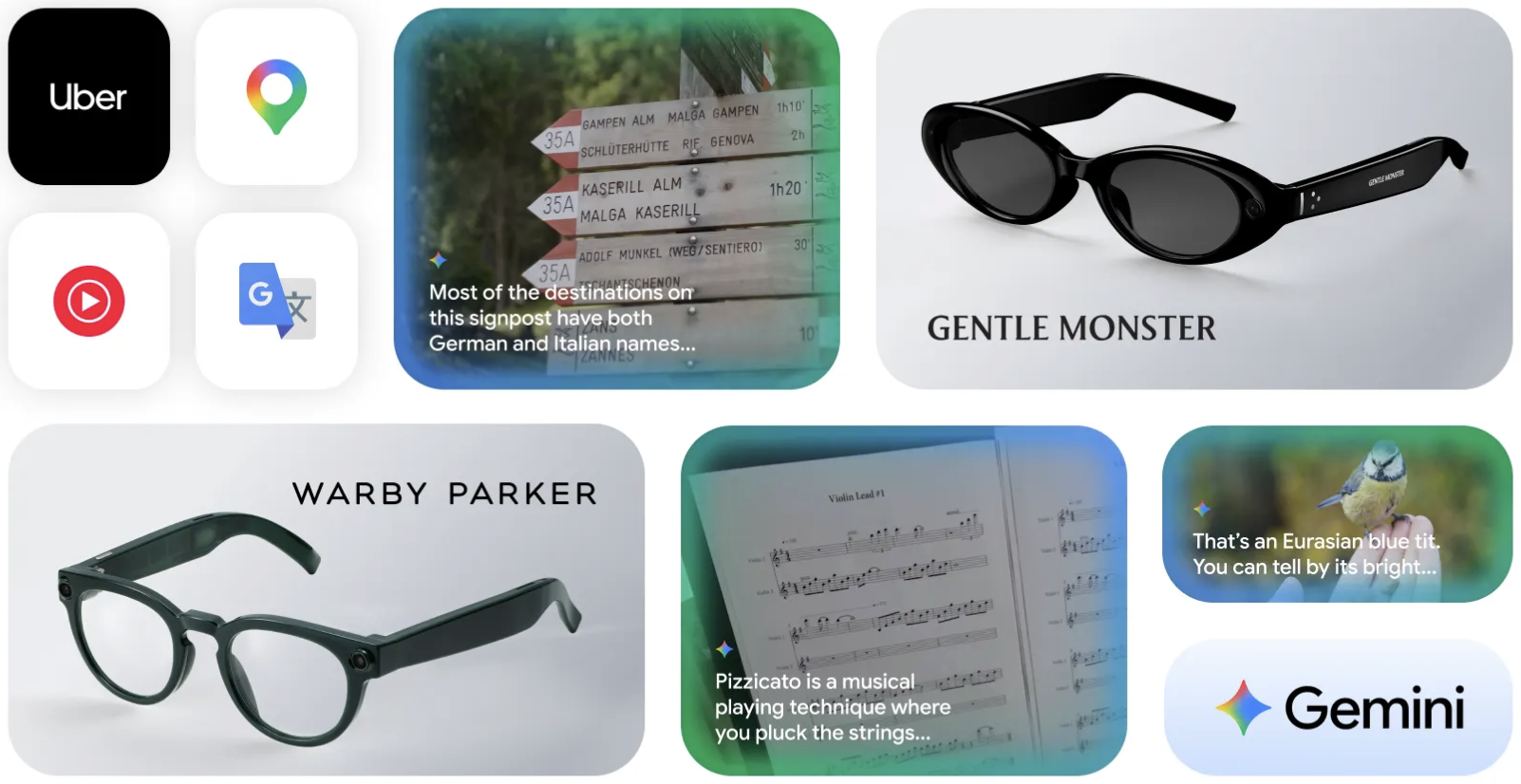
The contrast is philosophical. Apple’s bet is that spatial computing is an immersive experience you deliberately put on. Google’s bet is that it’s an ambient one you forget you’re wearing. It’s information that lives at the edge of your vision and fades when you don’t need it. By licensing Android XR across hardware and fashion partners, Google is reusing the exact playbook that made Android ubiquitous on phones: don’t win by building the one best device, win by being the layer inside everyone’s device.
For more details on Google’s smart glasses, check out their Inteligent Eyewear blogpost.
Cross-Device State Persistence: “Continue On”
Ambient glasses are only useful if they plug into the rest of your computing life without friction. That’s the job of “Continue On”, Google’s cross-device state-persistence layer. The premise is simple to state and brutal to engineer: hand off a live application state (not just a URL, but the full memory footprint, scroll position, and media stream) from your Android phone straight to an XR glass overlay or a tablet, mid-task, without interrupting your flow.
Start watching a recipe video on your phone, glance up, and it’s already playing as an overlay in your glasses while your hands stay free for cooking. Walk to your desk and the same session lands on your tablet at the exact frame you left. The networking and synchronization challenge here is real: the system has to serialize live state, ship it across devices over the local network, and rehydrate it on a different form factor fast enough that the handoff feels instantaneous rather than like a save-and-reopen.
This is the literal embodiment of environments that adapt to you. Your software stops being pinned to a single device and starts following your attention from surface to surface. The phone, the tablet, and the glasses stop being separate computers and start being one continuous environment that happens to have multiple windows into it.
“Continue On” is available in Android 17 (API 37). For a deeper dive check out the Continue On Android developer doc here.
Where to Go From Here?
Across all four themes, the same story keeps repeating. Gemini 3.5 Flash and Spark gave agents the speed and the safe place to work. Antigravity 2.0 made letting them run a calculated decision instead of a reckless one. Generative UI, Universal Cart, and Android Halo dissolved the static interface into something that assembles itself around your intent, and gave you a way to watch it happen. The Migration Assistant, open-sourced skills, and Chrome DevTools for Agents turned coding into directing intent under supervision. Finally, Android XR with “Continue On” carried the whole thing off the screen and into the space around you.
Step back and the arc is clear: software you use became software that works for you, which is becoming an environment that adapts to you. The baseline execution layer, such as the typing, the boilerplate, the multi-step grunt work, is being automated away.
So what’s there left for you to do? Quite a lot, it turns out! When the machine handles execution, the scarce and valuable human skills move up the stack: deciding what is worth building, exercising taste about what “good” looks like, and supervising systems that now act on our behalf. The developer of 2026 looks less like a typist and more like an architect and an editor who sets intent, defines guardrails, and judges results. The friction is leaving the software. The judgment, thankfully, is still ours.
If you want to go deeper, you can find the full set of session videos on the official Google I/O developer site, and keep an eye on Google’s official developer blog for rollout details. As always, keep checking back with Kodeco for tutorials on these new tools as they ship!