


Getting Started with Android Generative AI
Learn how to get started with generative AI in Android. This article explains Gemini models, on-device vs cloud AI, and how to choose the right AI approach for your Android app. By Zahidur Rahman Faisal.
Cloud Generative AI
Use cloud generative AI when you need capabilities beyond what on-device models can handle. Examples include long document analysis, code generation at scale or multimodal tasks involving large images or video. Gemini in the cloud can process text, images, audio and video inputs, provided that data is sent over the network.
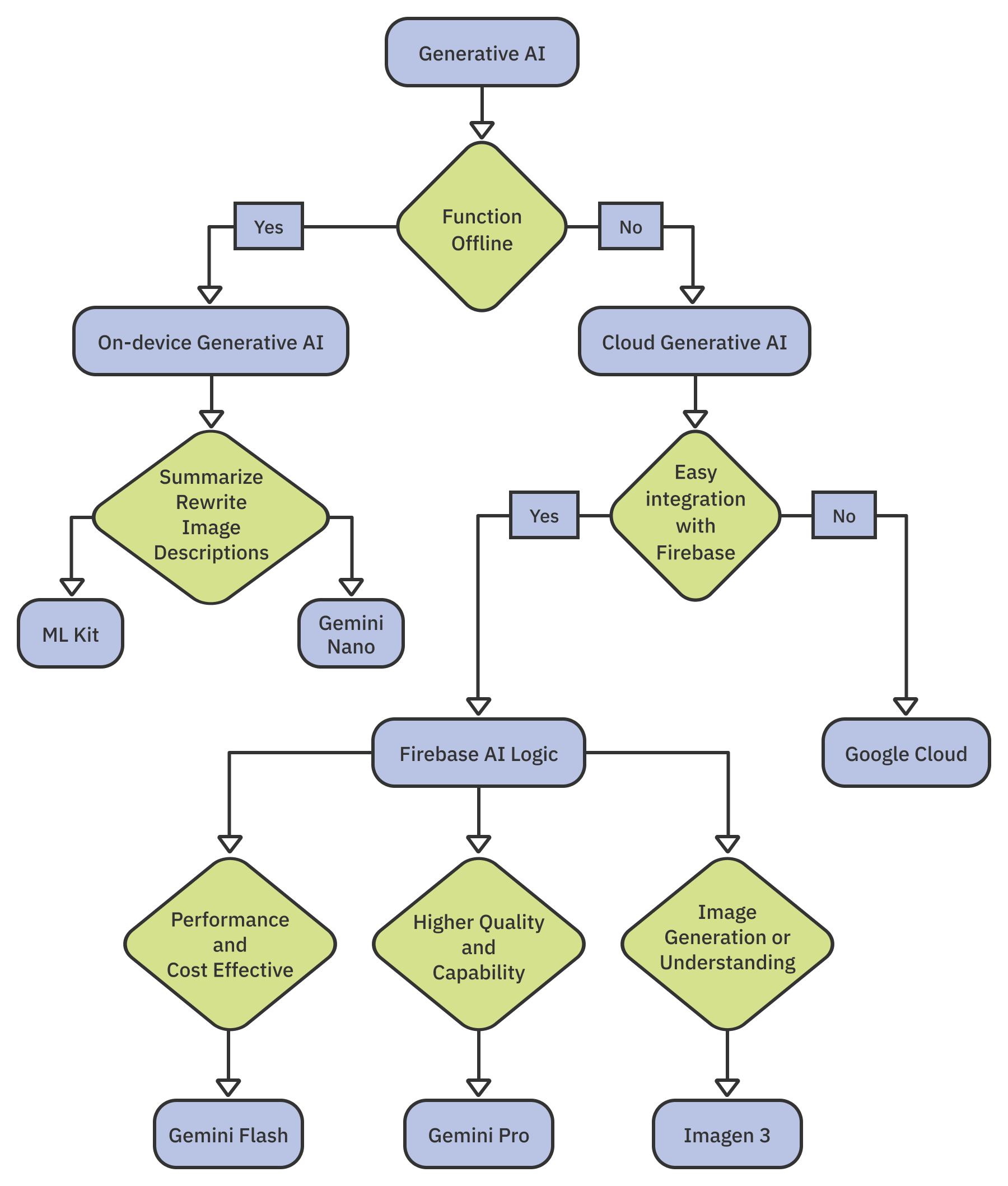
When considering a cloud-based solution, ask yourself: Do I prefer an easier implementation and a managed API experience?
If the answer is yes, Firebase AI Logic is a strong candidate. Firebase AI Logic allows Android apps to call state-of-the-art generative AI models in the cloud.
Firebase AI Logic offers different models and performance profiles depending on the type of generative task you need:
Google Cloud Platform
Google Cloud Platform is another cloud-based option. It is suitable if you are willing to manage your own backend integration and need a custom or third-party model, advanced fine-tuning or maximum flexibility and control.
- A custom or third-party model
- Advanced fine-tuning
- Maximum flexibility or control
Conclusion
If there’s one key takeaway from this chapter, it’s that getting started with generative AI on Android is not about choosing the best model in the abstract. It’s about choosing the right model for the feature you’re trying to build.
You’ve seen how Gemini Nano provides fast, private and offline intelligence on the device, while Gemini Flash and Gemini Pro open the door to powerful cloud reasoning, multimodality and much larger context windows. The real skill lies in mapping your feature to the right model, just as you would choose the right architecture pattern or database engine for a particular problem.
As Android developers, we now need to think about latency, privacy, hardware constraints and cost alongside user experience. That’s a new set of considerations, but it also opens the door to a new generation of app experiences.
As you start experimenting, don’t worry about memorizing every capability of every model. Instead, get comfortable asking the right questions:
- What is the user trying to accomplish?
- Does this need to work offline?
- How complex is the task?
- Do I care more about privacy, or more about capability?
- Will this scale with my users and my budget?
The flowchart below summarizes the best AI or ML solutions for different scenarios.
Continue Learning with Practical Android AI
This article is adapted from Practical Android AI, a hands-on guide to building intelligent Android apps using Google’s modern AI ecosystem.
Now that you understand the landscape — on-device AI, Gemini tiers, Firebase AI and beyond — you’re ready to start giving your users a taste of intelligent experiences on Android. Choose the most appropriate AI or ML solution for your app’s use case, and build smart, personalized features that truly enhance the user journey.
Explore the full book and continue building AI-powered Android apps.